
Github allows for the hosting of static Html sites for users, and organizations. This can be super valuable for developer starting off who wants to do something simple like host a personal resume website or a technical blog without the overhead costs.
The first version of this blog was actually hosted on Github pages when I started it fresh out of college. I used a combination of Jekyll, Html and Css. My posts were generated with a custom Rake task, and edited in Vim.
You can use a Github site for your personal account however I already have so I’ll be creating a new organization for this example. Make sure you are logged into Github and create a new organization by going to this url https://github.com/organizations/plan.
It should look something like this:
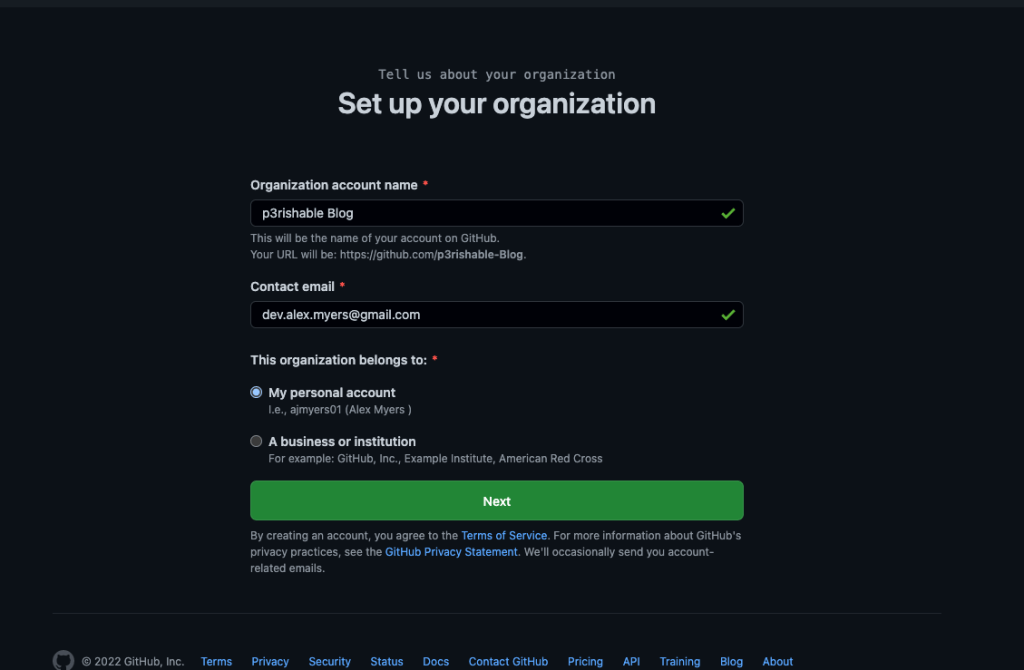
Create a new public repo underneath that organization and name it <name>.github.io. Replace name with either your user name or the org’s name depending on your situation. Make sure that the name is spelled correctly and that the visibility of the project is Public.

Next clone the repository onto your machine and create an index.html file.
git clone git@github.com:<name>/<name>.github.io.git
cd <name>.github.io
touch index.html
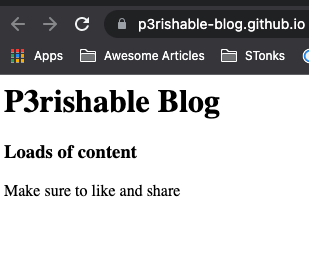
Open your index.html and add some content. Here is my example content:
<h1> P3rishable Blog </h1>

<h3> Loads of content </h3>

<p> Make sure to like and share </p>
Commit and push up to Github:
git add .
git commit -m "initial commit"
git push -u origin main
Next we will go to settings and open the pages section. In here you will set the source branch to main and save. This means any time you commit to main, Github will automagically deploy out your changes. You can also find the url to the hosted site on this page as well as the section for making it a custom domain.

Then if we access our site through the provided link https://p3rishable-blog.github.io/ on the settings page. We will see the following content rendered:
You can also use themes provided by Github or even use a secondary tool like Jekyll to create a static website. I focused on raw Html and Css because I think that is more useful when designing a unique looking site that stands out. You can see an example of my personal resume I have hosted on GitHub pages, with a custom url. https://www.alexmyers.net/
 P3rishable Blog