
The hidden cost of high res photos in web development

They say that a picture is worth a thousand words, but if that picture causes your website to load slow, Then it isn’t worth anything. It could be costing you greatly. Studies show that to prevent users drop off your website should load in 1-2 seconds. Any longer than that visitors become highly impatient and leave. One of the biggest and easiest to fix mistakes I’ve been seeing is new web developers not optimizing their image sizes for the web.

It’s great that you found some 4k high res 6000×5000 pictures that you can see every follicle of hair in that horse’s mane. However, not everyone is sitting at a workstation likely hard wired into a fast internet speed. More likely your visitors will be on a mobile device and using their data. The last thing they want is to watch your website sit and spin as you force them to download some 5MB high res photo that the web browser is going to downsize on the fly anyway to fit their tiny screen.

So what can we do about it? Well, we can attack it at two different angles. The first angle is image optimization is the act of decreasing file size without losing quality. The second angle would be implementing a lazy loading feature to allow the rest of your website’s content to load without having to wait for the bigger data files such as images to come across.

Image optimization can be done either at creation using a photo editing software like Adobe PhotoShop or GIMP. In that, you can reduce the photo resolution and size to be more web-friendly. Reducing a massive Photo from a DSLR into something more consumable like a 500×500 image can save possibly whole seconds and lots of data.
You can save even more data by running the image through an image optimizer such as TinyPNG.

The second prong attack will come from lazy loading. You can find an awesome lazy loading example here: Css Tricks Tutorials. In summary, you are going to use a super low resolution and lightweight photo, slap a blur effect on it, then replace the image with a high-quality one once it has finished loading across the network.

Utilizing these techniques can easily save you seconds off your load time, and drastically improve your sticking power with users. This will also improve your site’s SEO score which helps determine how it ranks in search engine results. Try out these methods and let me know how much time you shaved off!

Host a Free Static Website in 5 minutes with Github Pages

Github allows for the hosting of static Html sites for users, and organizations. This can be super valuable for developer starting off who wants to do something simple like host a personal resume website or a technical blog without the overhead costs.

The first version of this blog was actually hosted on Github pages when I started it fresh out of college. I used a combination of Jekyll, Html and Css. My posts were generated with a custom Rake task, and edited in Vim.

You can use a Github site for your personal account however I already have so I’ll be creating a new organization for this example. Make sure you are logged into Github and create a new organization by going to this url https://github.com/organizations/plan.

It should look something like this:

Create New Organization

Create a new public repo underneath that organization and name it <name>.github.io. Replace name with either your user name or the org’s name depending on your situation. Make sure that the name is spelled correctly and that the visibility of the project is Public.

Create the new Repository, Ensure it’s public, and named correctly

Next clone the repository onto your machine and create an index.html file.

git clone git@github.com:<name>/<name>.github.io.git
cd <name>.github.io
touch index.html

Open your index.html and add some content. Here is my example content:

<h1> P3rishable Blog </h1>

<h3> Loads of content </h3>

<p> Make sure to like and share </p>

Commit and push up to Github:

git add . 
git commit -m "initial commit"
git push -u origin main

Next we will go to settings and open the pages section. In here you will set the source branch to main and save. This means any time you commit to main, Github will automagically deploy out your changes. You can also find the url to the hosted site on this page as well as the section for making it a custom domain.

Repository Settings -> Pages

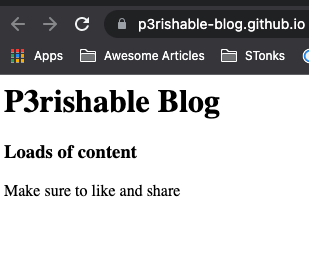
Then if we access our site through the provided link https://p3rishable-blog.github.io/ on the settings page. We will see the following content rendered:

You can also use themes provided by Github or even use a secondary tool like Jekyll to create a static website. I focused on raw Html and Css because I think that is more useful when designing a unique looking site that stands out. You can see an example of my personal resume I have hosted on GitHub pages, with a custom url. https://www.alexmyers.net/